> ## Documentation Index
> Fetch the complete documentation index at: https://docs.saucerswap.finance/llms.txt
> Use this file to discover all available pages before exploring further.
# Trade on the order book
> Use the SaucerSwap V3 central limit order book: read depth and the trade tape, place limit and market orders, track fills, and cancel open orders.
The **trade** page is SaucerSwap V3: a central limit order book (CLOB) where you set the price instead of taking the pool's. Orders are matched off-chain and settled on-chain, and on enabled markets they can also fill against AMM liquidity. For the concepts behind it, see [SaucerSwap V3](/protocol/saucerswap-v3).
 Order book trading carries risks beyond swapping: orders can fill partially, later than expected, or at prices different from interface estimates, and displayed statuses can be provisional. Read the [V3 order book risk notice](/legal/orderbook-risk-notice) before trading.
## Prerequisites
* A connected [Hedera wallet](/get-started/wallet)
* [HBAR](/get-started/hbar) to cover network fees
* Tokens on the side of the market you want to trade
## Reading the market
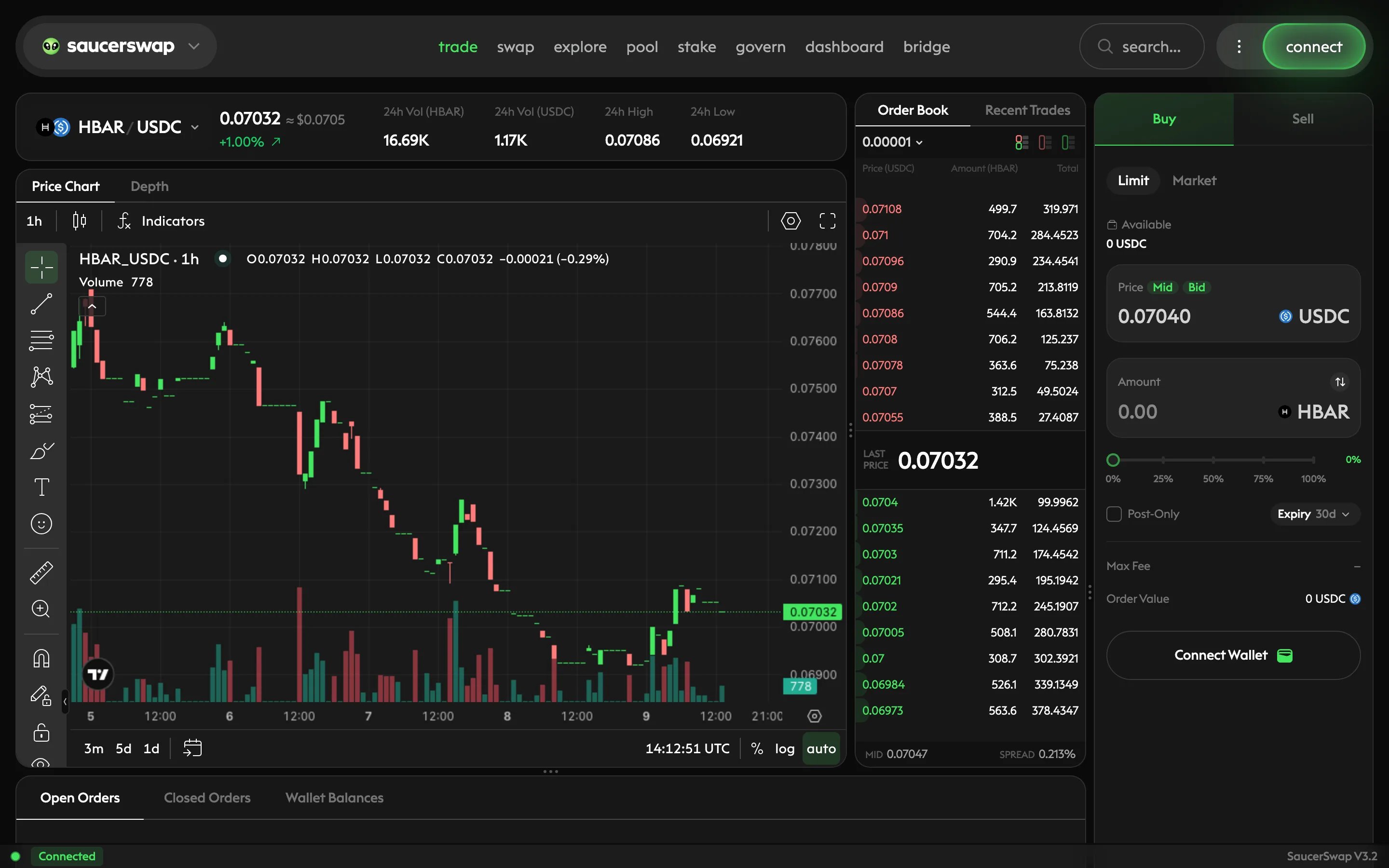
Each market pairs a base token with a quote token, priced as quote per base. The main surfaces on the page:
| Surface | What it shows |
| ----------- | -------------------------------------------------------------------------------------------------------------------- |
| Order book | Resting buy orders (bids) and sell orders (asks) by price level; the gap between best bid and best ask is the spread |
| Trade tape | Recent fills in the market — price, size, and side, most recent first |
| Price chart | The market's price history |
| Order entry | Where you choose side, order type, price, and amount |
Markets have trading increments: prices and sizes snap to the market's tick and lot grid, and each order must meet the market's minimum notional. A market can also be halted by the operator, during which orders do not match.
## Order types
* **Market order** — executes immediately against the best available prices in the book (and AMM liquidity on enabled markets). You trade certainty of execution for certainty of price.
* **Limit order** — rests in the book at your chosen price until it fills, you cancel it, or it expires at its deadline. Limit order deadlines range from 30 seconds to 90 days. A resting limit order is maker flow; an order that crosses the spread takes liquidity.
Fees differ by role: takers pay a fee while makers can receive a rebate, and rates are set per market. See [V3 fees](/protocol/saucerswap-v3/fees).
## Place an order
Go to the **trade** page and select the market you want from the market selector.
Before your first order, the interface requires you to accept the V3 legal terms in-app. Review the [risk notice](/legal/orderbook-risk-notice) and [terms of service](/legal/terms-of-service) first.
Pick buy or sell, then market or limit. For a limit order, set your price and, if you want one, an expiry deadline; for a market order, just the amount.
Enter how much you want to trade. Check the order value, the estimated fee, and — for market orders — how far your size reaches into the book's depth. Large market orders in thin books execute at progressively worse prices.
Confirm and sign the order in your wallet. Signing authorizes settlement within the exact parameters you signed — price limit, amount, and deadline — and nothing beyond them. Review every wallet prompt before signing.
Open orders and fills appear on the trade page, and your full history is on the **dashboard** page under **Order History**. Orders can fill partially: several fills may add up to your total, and a limit order can remain partly filled until its deadline.
## Cancel an order
Select the open order and request cancellation. Cancellation is asynchronous: the request is accepted first and confirmed shortly after, so treat an order as live until you see it reach a canceled state. A cancellation can arrive too late to prevent a match that was already in flight — this is inherent to order book trading, not a malfunction.
## Order lifecycle
An order moves through: open → partially filled (possibly repeatedly) → filled, canceled, or expired. The on-chain settlement contract is the source of truth; interface and API statuses can briefly lag it. If a status looks inconsistent, check the transaction on [HashScan](https://hashscan.io/mainnet/dashboard) before acting on it.
Building a bot or integration? The same order book is fully accessible programmatically — see the [Orderbook API](/api-reference/orderbook/overview).
## Next steps
How off-chain matching, on-chain settlement, and the AMM backstop fit together.
Taker fees, maker rebates, and how fee rates are expressed.
The full V3 order book risk disclosure.
For instant execution at the best quoted route, use the swap page.
Order book trading carries risks beyond swapping: orders can fill partially, later than expected, or at prices different from interface estimates, and displayed statuses can be provisional. Read the [V3 order book risk notice](/legal/orderbook-risk-notice) before trading.
## Prerequisites
* A connected [Hedera wallet](/get-started/wallet)
* [HBAR](/get-started/hbar) to cover network fees
* Tokens on the side of the market you want to trade
## Reading the market
Each market pairs a base token with a quote token, priced as quote per base. The main surfaces on the page:
| Surface | What it shows |
| ----------- | -------------------------------------------------------------------------------------------------------------------- |
| Order book | Resting buy orders (bids) and sell orders (asks) by price level; the gap between best bid and best ask is the spread |
| Trade tape | Recent fills in the market — price, size, and side, most recent first |
| Price chart | The market's price history |
| Order entry | Where you choose side, order type, price, and amount |
Markets have trading increments: prices and sizes snap to the market's tick and lot grid, and each order must meet the market's minimum notional. A market can also be halted by the operator, during which orders do not match.
## Order types
* **Market order** — executes immediately against the best available prices in the book (and AMM liquidity on enabled markets). You trade certainty of execution for certainty of price.
* **Limit order** — rests in the book at your chosen price until it fills, you cancel it, or it expires at its deadline. Limit order deadlines range from 30 seconds to 90 days. A resting limit order is maker flow; an order that crosses the spread takes liquidity.
Fees differ by role: takers pay a fee while makers can receive a rebate, and rates are set per market. See [V3 fees](/protocol/saucerswap-v3/fees).
## Place an order
Go to the **trade** page and select the market you want from the market selector.
Before your first order, the interface requires you to accept the V3 legal terms in-app. Review the [risk notice](/legal/orderbook-risk-notice) and [terms of service](/legal/terms-of-service) first.
Pick buy or sell, then market or limit. For a limit order, set your price and, if you want one, an expiry deadline; for a market order, just the amount.
Enter how much you want to trade. Check the order value, the estimated fee, and — for market orders — how far your size reaches into the book's depth. Large market orders in thin books execute at progressively worse prices.
Confirm and sign the order in your wallet. Signing authorizes settlement within the exact parameters you signed — price limit, amount, and deadline — and nothing beyond them. Review every wallet prompt before signing.
Open orders and fills appear on the trade page, and your full history is on the **dashboard** page under **Order History**. Orders can fill partially: several fills may add up to your total, and a limit order can remain partly filled until its deadline.
## Cancel an order
Select the open order and request cancellation. Cancellation is asynchronous: the request is accepted first and confirmed shortly after, so treat an order as live until you see it reach a canceled state. A cancellation can arrive too late to prevent a match that was already in flight — this is inherent to order book trading, not a malfunction.
## Order lifecycle
An order moves through: open → partially filled (possibly repeatedly) → filled, canceled, or expired. The on-chain settlement contract is the source of truth; interface and API statuses can briefly lag it. If a status looks inconsistent, check the transaction on [HashScan](https://hashscan.io/mainnet/dashboard) before acting on it.
Building a bot or integration? The same order book is fully accessible programmatically — see the [Orderbook API](/api-reference/orderbook/overview).
## Next steps
How off-chain matching, on-chain settlement, and the AMM backstop fit together.
Taker fees, maker rebates, and how fee rates are expressed.
The full V3 order book risk disclosure.
For instant execution at the best quoted route, use the swap page.