> ## Documentation Index
> Fetch the complete documentation index at: https://docs.saucerswap.finance/llms.txt
> Use this file to discover all available pages before exploring further.
# Bridge assets in the app
> Move tokens between Hedera and other chains from SaucerSwap's bridge page, with routing over Axelar and LayerZero, fee expectations, and fixes.
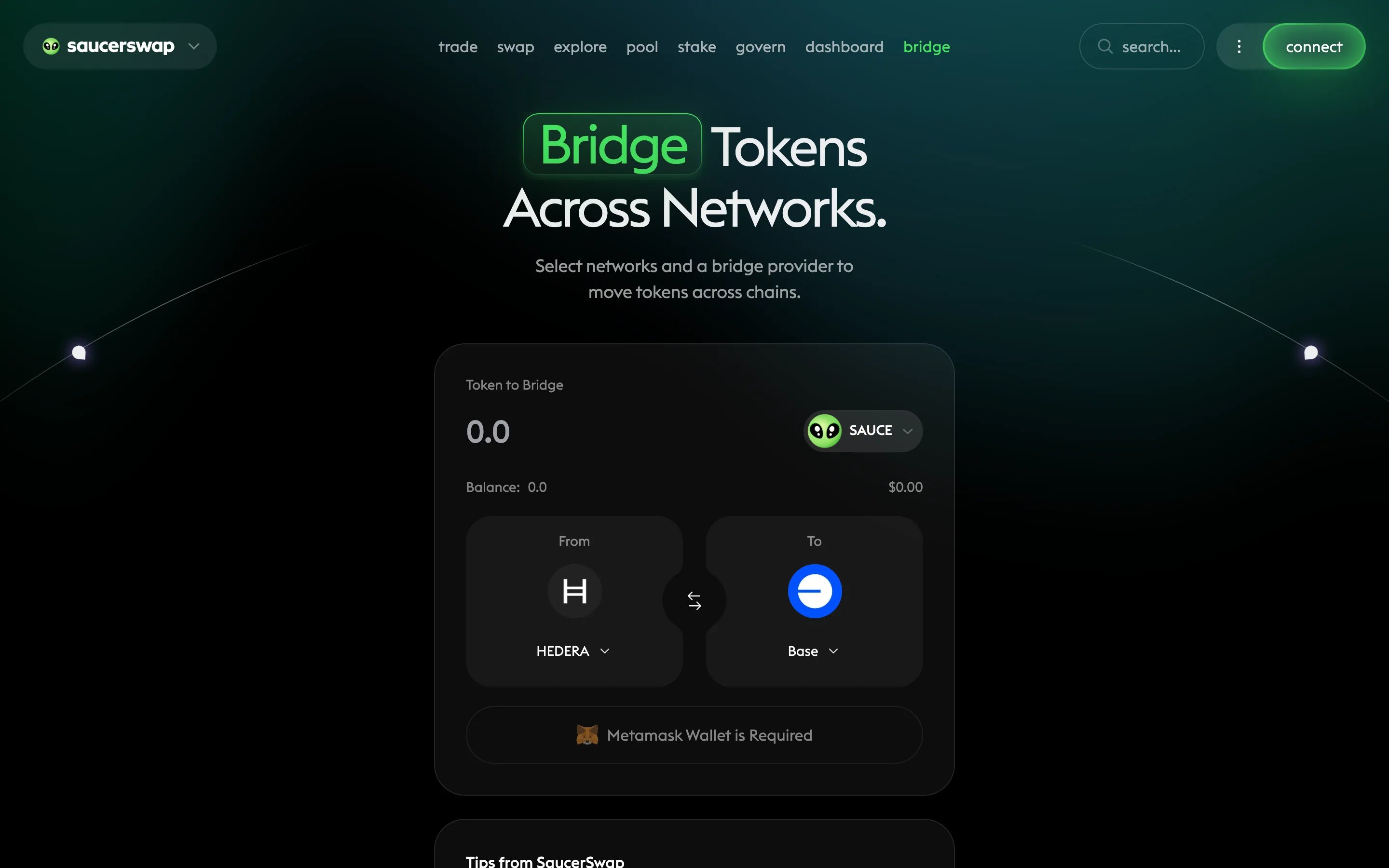
The **bridge** page moves assets between Hedera and other chains without leaving the SaucerSwap app. Transfers route over the Axelar and LayerZero interoperability networks — the same infrastructure behind Squid and Stargate — with the routing handled for you.
 Never bridge through Hashport guides or contracts: the Hashport bridge was permanently decommissioned on May 31, 2026, and assets wrapped by it are permanently unredeemable. See [Bridge to Hedera](/get-started/bridge-to-hedera).
## Prerequisites
* A connected [wallet](/get-started/wallet) — cross-chain routes generally work best with an EVM wallet such as MetaMask, which can hold assets on both sides
* Gas on the source chain (HBAR when bridging from Hedera; the native token of the source chain otherwise)
* The token you want to bridge
## Bridge step by step
Go to the **bridge** page and connect your wallet.
Select the source chain and the token you are sending, then the destination chain and the token to receive.
Enter how much to bridge. Review the quoted route, the estimated fees (network gas on both chains plus the route's bridge fee), and the estimated arrival time before continuing.
Approve the token if prompted, then confirm the bridge transaction in your wallet.
Cross-chain transfers take anywhere from a few minutes to a few hours depending on the chains involved. The source-chain transaction confirming quickly does not mean the transfer is complete — delivery happens in a second transaction on the destination chain.
Check your balance on the destination chain. For Axelar-routed transfers, track progress on [AxelarScan](https://axelarscan.io/) by searching your transaction hash or wallet address.
## Troubleshooting
| Problem | What to do |
| ------------------------------------------- | --------------------------------------------------------------------------------------------------------------------------------- |
| Transfer seems stuck | Look up the transaction hash on [AxelarScan](https://axelarscan.io/); most "stuck" transfers are still propagating between chains |
| Tokens arrived but are invisible | On Hedera, associate the token with your account; in MetaMask, import the token by its EVM address |
| Transaction fails at the start | Check you have enough gas on the source chain and that your wallet holds the token being bridged |
| Issue after a successful source transaction | For Squid/Axelar routes, contact [Squid support](https://support.squidrouter.com/) with your transaction hash |
More error-keyed fixes are in [Troubleshooting](/resources/troubleshooting).
## Next steps
The Axelar and LayerZero routes, and the Hashport decommission notice.
Trade bridged tokens for any listed HTS token.
Token issuers: deploy an HTS token to other chains via Axelar ITS.
Never bridge through Hashport guides or contracts: the Hashport bridge was permanently decommissioned on May 31, 2026, and assets wrapped by it are permanently unredeemable. See [Bridge to Hedera](/get-started/bridge-to-hedera).
## Prerequisites
* A connected [wallet](/get-started/wallet) — cross-chain routes generally work best with an EVM wallet such as MetaMask, which can hold assets on both sides
* Gas on the source chain (HBAR when bridging from Hedera; the native token of the source chain otherwise)
* The token you want to bridge
## Bridge step by step
Go to the **bridge** page and connect your wallet.
Select the source chain and the token you are sending, then the destination chain and the token to receive.
Enter how much to bridge. Review the quoted route, the estimated fees (network gas on both chains plus the route's bridge fee), and the estimated arrival time before continuing.
Approve the token if prompted, then confirm the bridge transaction in your wallet.
Cross-chain transfers take anywhere from a few minutes to a few hours depending on the chains involved. The source-chain transaction confirming quickly does not mean the transfer is complete — delivery happens in a second transaction on the destination chain.
Check your balance on the destination chain. For Axelar-routed transfers, track progress on [AxelarScan](https://axelarscan.io/) by searching your transaction hash or wallet address.
## Troubleshooting
| Problem | What to do |
| ------------------------------------------- | --------------------------------------------------------------------------------------------------------------------------------- |
| Transfer seems stuck | Look up the transaction hash on [AxelarScan](https://axelarscan.io/); most "stuck" transfers are still propagating between chains |
| Tokens arrived but are invisible | On Hedera, associate the token with your account; in MetaMask, import the token by its EVM address |
| Transaction fails at the start | Check you have enough gas on the source chain and that your wallet holds the token being bridged |
| Issue after a successful source transaction | For Squid/Axelar routes, contact [Squid support](https://support.squidrouter.com/) with your transaction hash |
More error-keyed fixes are in [Troubleshooting](/resources/troubleshooting).
## Next steps
The Axelar and LayerZero routes, and the Hashport decommission notice.
Trade bridged tokens for any listed HTS token.
Token issuers: deploy an HTS token to other chains via Axelar ITS.